Jumat, 31 Agustus 2012

Nimbuzz 2.5.1 iOS Adds Friend Search


Nimbuzz, the free voice-call and instant messaging app, has been updated to version 2.5.1 on the iPhone to add a new option to search friends within the Nimbuzz network.

A cross-platform communication app, Nimbuzz lets you make free voice calls (VoIP), send unlimited chat messages, and share files across the likes of Facebook, Gtalk Messenger, Yahoo Messenger, and Microsoft’s Live Messenger (MSN).

Version 2.5.1 was just released today with a new Friend Search function that lets you look for your friends by name or ID within the Nimbuzz ecosystem.

The development team makes it official in a blog entry, stating, “This version introduces a close integration of ‘Friend Search’ functionality within the Nimbuzz app.”

“Now you can search for your friends in the 100 million strong Nimbuzz community worldwide with just a click of a button. Search Explore and Expand your friend network on Nimbuzz.”

To search for someone from your contact list, simply drag your contact list down to get to the ‘Search Contacts’ bar and punch in the name of the person you are looking for.

Then just click on the ‘Search on Nimbuzz’ button and “it will list all the search results and you can add people directly from the search result page,” says the development team.

In order to search for friends from the Add Contact screen, just hit the ‘+’ (plus) button at the top right corner of the UI and select “Search for friends.”

Although this is not documented in the release notes, Nimbuzz 2.5.1 also brings a regular feed of app recommendations.

Users can navigate to the “More” tab in Nimbuzz and click on the “Apps+” button to see the respective recommendations.

“Every time you click on Apps+, you get a new recommended App,” says the Nimbuzz team.

The 2.5.1 update further enhances the chatting experience by delivering a number of performance improvements and bug fixes.

Nimbuzz is compatible with iPhone, iPod touch, and iPad and requires iOS 4.0 or later.

Download Nimbuzz iOS (Free)

Via: Nimbuzz 2.5.1 iOS Adds Friend Search

New Django Unchained Photo Hits the Net


Quentin Tarantino will be back on the big screen with yet another totally Tarantino-esque film come December 25, “Django Unchained.” A new promotional photo for it has been released, just click on the image above to see it in full. 

Starring Jamie Foxx, Christoph Waltz and Leonardo DiCaprio as the villain, “Django” is a western that tells the story of a bounty hunter who frees a slave to help him hunt down a group of outlaws.

For once, Waltz plays the good guy – sort of.

Back to the picture: you will see that it’s of Foxx in character, as he’s preparing to shoot a six-shooter against a gorgeous winter backdrop. It’s not much, but it beats no picture at all.

“Django Unchained” premiered at Cannes, where it was welcomed with raving reviews. That explains today’s hype around the project.

Via: New Django Unchained Photo Hits the Net

Glasgow Commonwealth Games 2014 Scams Already Making the Rounds


There are almost two years until the 2014 Glasgow Commonwealth Games start, but cybercriminals are already trying to trick unsuspecting users in participating in a lottery scheme.

It all starts with an email apparently sent by the Gordon Arthur, the Glasgow 2014 director of communications, experts from Bitdefender inform.

“You have been enlisted in the ongoing ‘XX Commonwealth Games, Glasgow 2014’ to have won the sum of GBP 959,000 (Nine Hundred and Fifty Thousand Great British Pounds) held in UK on August 27,2012 through our Online Balloting System,” the phony email reads.

In order to claim the prize, the victim must provide the fraudsters with his/her name, country of residence, telephone number and occupation. Once these details are provided, the crooks will most likely ask for a transaction fee that’s needed to complete the money transfer.

Glasgow 2014 organizers are aware of these scams and they warn internauts never to provide their personal details in response to such emails.

Via: Glasgow Commonwealth Games 2014 Scams Already Making the Rounds

Bing Adds Facebook Photos Search


Google may be the only one catching flack for integrating "social" features into search, but everyone seems to agree that it's the way forward. In fact, Bing is arguably in a better position to service the social niche thanks to its partnership with Facebook.

Evidence of that partnership is the latest "social" feature tacked onto Bing, the ability to search through your and your friends' Facebook photos.

A lot of people spend a lot of time with photos on Facebook and those same people upload more and more photos each day.

Most may be forgettable, but you may still want to find that one photo in a thousand you actually want to see again.

With Facebook search being a joke and not a very funny one, until now, you didn't really have any options.

Bing Friends Photo search allows you to discover all of the photos in your feed, find photos from your friends and even search through your own photos.

You have to connect your Facebook account to your Microsoft one, of course, and you need to allow the Bing app to browse through your feed, an optional permission, for this to work.

"Bing’s sidebar already shows you friends who have posted photos related to your search based on photo title, album description or caption, making it easy to find friends who might know about your search," Bing's Ian Lin wrote.

"With today’s release, we are taking this a step further and letting you search and browse your Facebook friends’ photos right in Bing," he announced.

"Now simply by clicking on a photo in the sidebar, you will be linked to a full experience on Bing where you can see more photos from your Facebook friends that match your search. From there, you can also search for additional photos, or simply browse the latest photos from your friends," he said.

Via: Bing Adds Facebook Photos Search

Trend Micro Releases Files in Flight Cloud Computing e-Guide


A few years ago, when people talked about the cloud, they would usually refer to it from a meteorological standpoint. Now, the story is a whole lot different. Although many people don’t actually know what the cloud is, it has become an important part of our lives.

In order to help companies and individuals better understand what the cloud is all about, Trend Micro has released a useful e-guide called “Files in Flight: What You Need to Know About Cloud Storage.”

The guide explains the “cloud” concept, the different ways in which it can be used, reasons for moving to the cloud, but also the threats and flaws that haunt it.

It’s clear that there are a lot of issues that need to be addressed when it comes to the cloud. Fujitsu, eBay and Verizon have even teamed up and formed the Big Data Working Group, trying to address some of them.

And since it’s clear that in one way or another you’re bound to interact with the cloud, check out this great guide.

Via: Trend Micro Releases Files in Flight Cloud Computing e-Guide

Adobe Confirms Retina Display Update for Photoshop/Lighroom


Avid users of Adobe’s powerful image editing solutions are being promised that Photoshop and Lightroom will get the Retina-display treatment this fall. Creative Cloud members will be the first to get it, says Adobe.

Confirmed on the Photoshop blog, the Retina update is a joint effort by the Photoshop and Lightroom teams which are “pleased to announce we will provide support for HiDPI displays in the coming months, including the Retina Display available on the new MacBook Pro.”

Retooling Photoshop to make it look sharp on HiDPI screens is no walk in the park, says Adobe, but they’ll get there eventually, the two teams promise.

“Supporting this new technology requires significant work by our product teams and we’re committed to provide a free update to all Photoshop CS6 customers this Fall and Lightroom 4 as soon as the work is complete,” says Adobe.

Creative Cloud members will be the first to receive the Retina Photoshop update. Those enrolled with Creative Cloud receive updates more frequently, and “in advance of updates for non-members.”

Sadly, Photoshop Elements is being put on hold as far as Retina-support is concerned.

“While Photoshop, Photoshop Touch and Lightroom will be joining Adobe Ideas in their support of HiDPI Retina Displays, Photoshop Elements will not fully support HiDPI displays in the immediate future,” Adobe says.

The Flash makers promise to assess the situation and determine the amount of resources required to support these new displays in Lightroom, at which point it may begin development.

Creative Cloud members are again favored with a new set of features planned for release in the coming months. Adobe offers no specifics, but customers are told to “stay tuned for more details.”

Adobe thanks customers for their patience as they work out the kinks to make Photoshop Retina-ready.

Via: Adobe Confirms Retina Display Update for Photoshop/Lighroom

WolframAlpha Brought to Your Desktop


The power of Wolfram|Alpha is truly amazing. What's even greater is that it's available for free to anyone with Internet access. For those who don't know yet, Wolfram|Alpha is a pioneering project with the goal of making the world's information computable.

Basically, Wolfram|Alpha uses numbers and facts to give you a concrete answer to your question. It solves intricate equations and shows you the steps it took to get to the end result.

Wolfram|Alpha also provides detailed statistics in a great number of domains, allows you to compare two or more entities, and much more. The possibilities are gigantic.

WolfCalc is a lightweight and affordable desktop application ($1.99 from the App Store) that provides access to all the functions of the Wolfram|Alpha Computational Knowledge Engine.


The Looks

As the developer has already stated, WolfCalc is a minimalistic application as far as the user interface is concerned. Its main window has a standard Mac OS X look and feel and you'll be able to adjust its size by dragging one of its corners.

WolfCalc can be opened in two ways – mobile or standard. The standard view is exactly the same as the website-based version and the mobile view is smaller and doesn't include services such as favorites or history. By default, WolfCalc will open in the mobile view.

Since there is nothing to compare between WolfCalc's standard view and the website-based version, we will mostly discuss about the advantages and disadvantages of WolfCalc when experienced in the mobile view.

The mobile view will only enable you to search and view the results. You will find the search box in the main window, where you can input your questions. Here, you can also access a link to several examples on how to use Wolfram|Alpha.

Additionally, the mobile view provides two more links in its main window: one that allows you to read a brief user guide and another that provides access to the project's history and main aspects.

From the lower toolbar, you will be able to use three standard buttons that help you navigate inside the application with more ease: the forward, back and reload buttons.

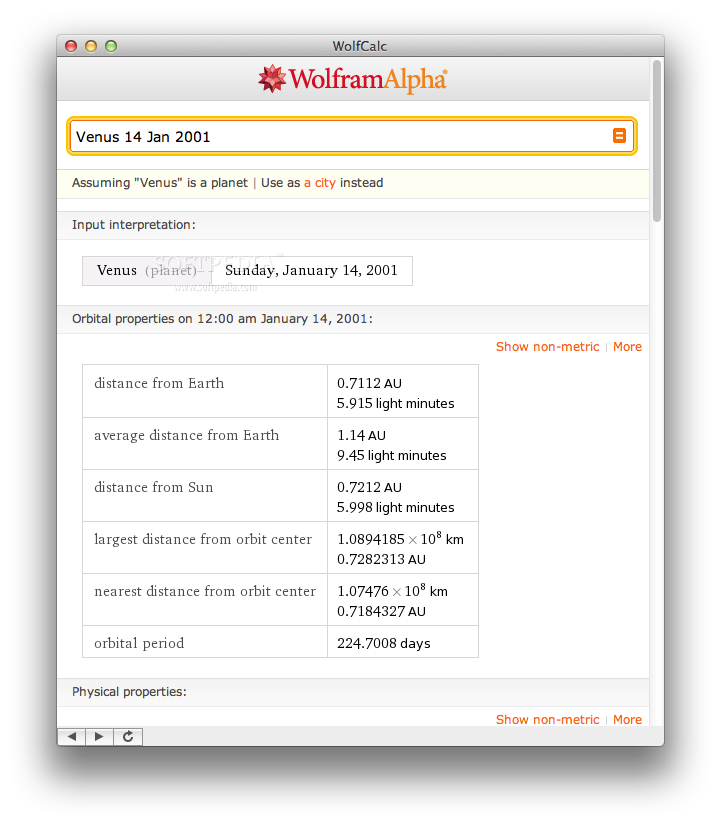
After you've finished typing your search query and hit the enter key, the result window will be displayed, of course. This window perfectly resembles the browser-based result frame.

The main reason for using a small front end like WolfCalc instead of a browser is to get rid of all the distractions. Also, WolfCalc was built with accessibility in mind. Instead of clicking on the Wolfram tab from your browser, you can simply use the WolfCalc application.

Since WolfCalc’s window is only as big as the result frame, you can move it to any area of your screen. Think of WolfCalc as a sort of desktop calculator but a lot more powerful.

Additionally, WolfCalc can stay on top of other windows. If you're working on a small screen (e.g. a MacBook), then this option will be quite useful to you.

A major drawback of the mobile view is that it doesn't allow you to log in to your Wolfram|Alpha account. Consequently, you won't be able to access your favorite computations, the history and preferences (not to mention the Pro features) that the free browser-based version provides.

However, if you really need to access these options, switch to the Standard view or open the website-based version.

The Works

Other than being a front end to the Wolfram|Alpha Computational Knowledge Engine, WolfCalc doesn't bring any new features of its own. If you are already accustomed to Wolfram|Alpha, then you won't need any help in using this app.

In other words, everything you can do with this app is also available on the Wolfram|Alpha website. Note that, since WolfCalc is a front end, it will need an Internet connection to work.

On a more positive note, we observed that the loading time of the result window isn't different from the browser-based version. This makes WolfCalc ideal when you need to quickly solve a mathematical equation, for example.

The Good


WolfCalc's mobile view is very compact and readily accessible. This way, you will be able to focus on your work without any distractions getting in your way.

The Bad

The mobile view is probably too simplistic for some users. It should at least include links to the favorites, history and preferences.

The Truth

WolfCalc does a great job bringing Wolfram|Alpha to the desktop. Although some of Wolfram|Alpha’s services aren't available in the mobile view, we can still consider WolfCalc to be a noteworthy and easy-to-use OS X utility for accessing this powerful knowledge engine.

Here are some snapshots of the application in action:

Review imageReview imageReview imageReview imageReview image


Via: WolframAlpha Brought to Your Desktop